


How to Free Up Storage with Temporary Files
Date
2026-08-06
Views
167

🌟 Your files getting piled up and it cost time to delete them. This tutorial will help you free up your storage in instant! Follow the steps below!
1️⃣ Navigate to Storage:
● Open setting, after that click 'System' and choose 'Storage'.
2️⃣Scan Temporary Files :
● After going to 'Storage' section navigate to 'Temporary files' and let the Windows Scan your files and it will notify your if its safe for deletion.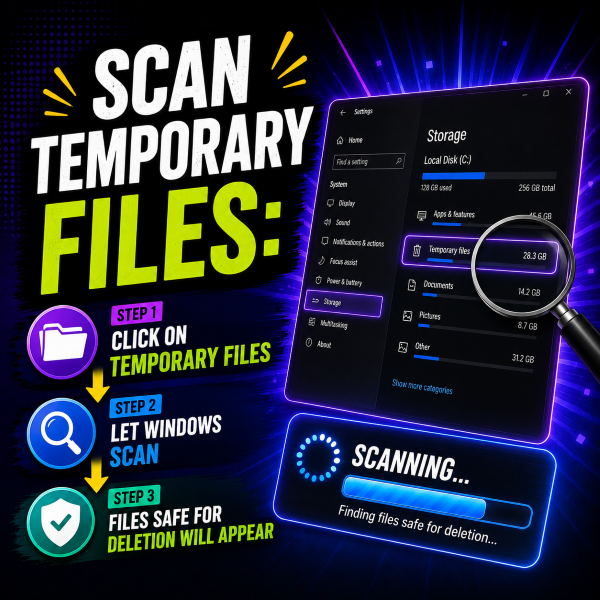
3️⃣ Review and Clean
● In this section review the automatically checked options, uncheck any items you wish to keep, and click Remove files. 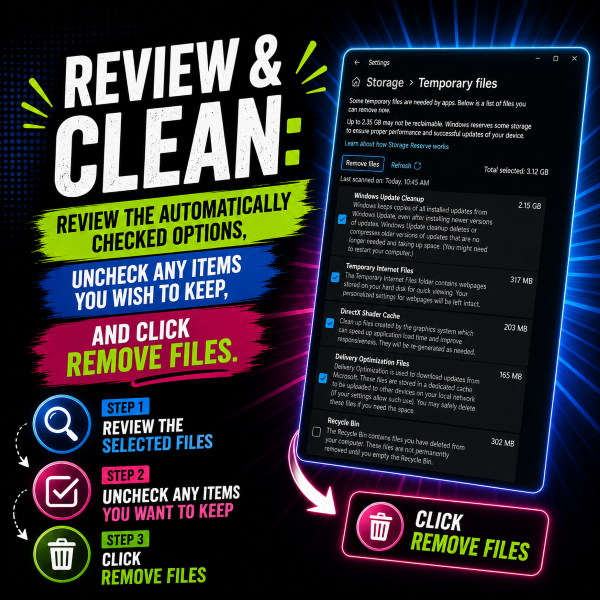
💁♂️ Important Warning : Be cautious if the Downloads option is checked—selecting it will permanently delete everything inside your Downloads folder. Regularly clearing temporary files helps keep your system organized and frees up disk space.
⭐ After doing the steps, you have now a free and clean storage that you can use! What are you waiting for? Try these steps now!
-------------------------------- --------------------------------- ---------------------------------
🎥 For the complete video presentation, please click the link below:
👉 https://www.youtube.com/watch?v=O9lIkT-zQ-w
🎓 For tips, guides, and tutorial content, please visit our official YouTube channel:
👉 https://www.youtube.com/@OPENPINOYiWatchYou
📞 Contact Information
For inquiries and further assistance, please reach us through the following channels:
📱 Mobile / Viber: 0917-822-1232 / 0917-822-3232
📧 Email: openpinoy_onlinesales@hotmail.com
🌐 Website:
👉 Website for B2B - WWW.OPENPINOY.NET
👉Website for Retail - WWW.OPENPINOY.COM