


Forgot your Windows Password? Try this CMD Trick!
Date
2026-05-29
Views
335

📄 You might have encountered this problem before but don't worry because this trick will help you to fix it. Just follow these steps.
1️⃣ Open Command Prompt
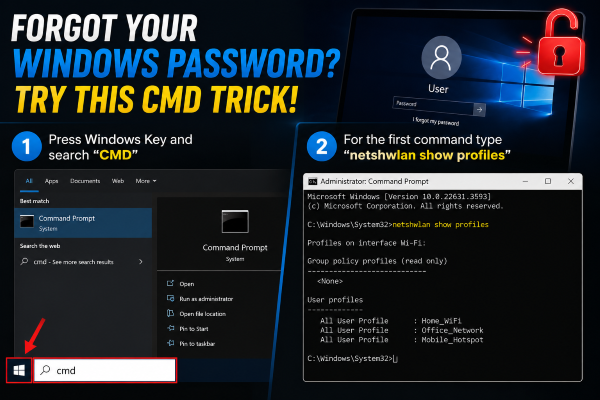
2️⃣ Show Password Command
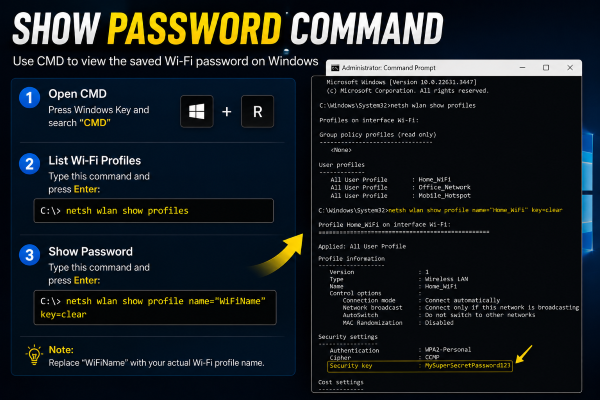
3️⃣ Finishing the command
● After entering your WiFi Name in command prompt, wait for the result and the password will appear beside “Key Content” save it and it's done.
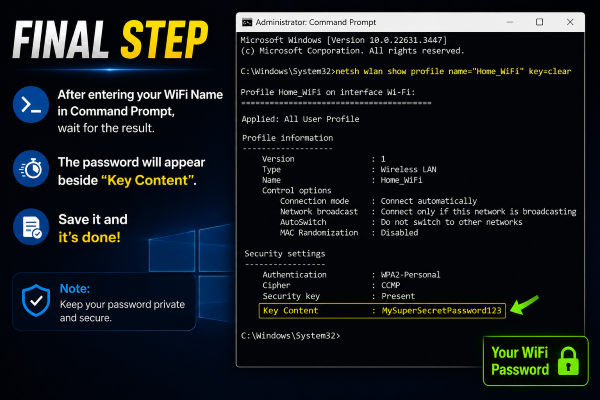
✅ and you’re done! It's simple right? What are you waiting for try this CMD Trick now!
🎥 For the complete video presentation, please click the link below:
👉 https://youtu.be/IGNX4KXFMtA?si=CkfF8H6pcjvLEjSk
🎓 For tips, guides, and tutorial content, please visit our official YouTube channel:
👉 https://www.youtube.com/@OPENPINOYiWatchYou
📞 Contact Information
For inquiries and further assistance, please reach us through the following channels:
📱 Mobile / Viber: 0917-822-1232 / 0917-822-3232
📧 Email: openpinoy_onlinesales@hotmail.com
🌐 Website:
👉 Website for B2B - WWW.OPENPINOY.NET
👉Website for Retail - WWW.OPENPINOY.COM
OPENPINOY©️
🤝 We are pleased to assist you with your needs.