


Microsoft Extends Windows 10 Support (ESU 2026 Update Explained)
Date
2025-12-04
Views
435

If you’re still using Windows 10, this update gives you one more year of security protection while you plan your upgrade to Windows 11.
Microsoft is extending security support for Windows 10 beyond its official end-of-support date through a program called Extended Security Updates (ESU).
🧠 1. What Support Ending Means
• Microsoft officially ended standard free support for Windows 10 on October 14, 2025, meaning the OS no longer gets free monthly security patches, bug fixes, or technical assistance.
• Without updates, systems become more vulnerable to malware and other security risks over time.

🔐 2. What the ESU Program Is
• The Extended Security Updates (ESU) program allows eligible Windows 10 PCs to keep receiving critical security updates until October 13, 2026, giving users one more year of protection after official support ends.
• These are security-only patches — no new features, non-security bug fixes, or full technical support are provided.
🛠️ 3. How to Enroll
The video walks through how users can enroll in ESU via the Windows Update settings:
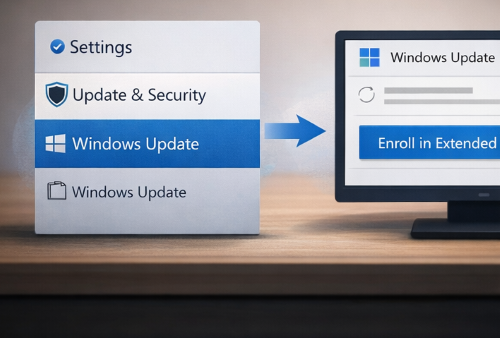
• Open Settings > Update & Security > Windows Update.
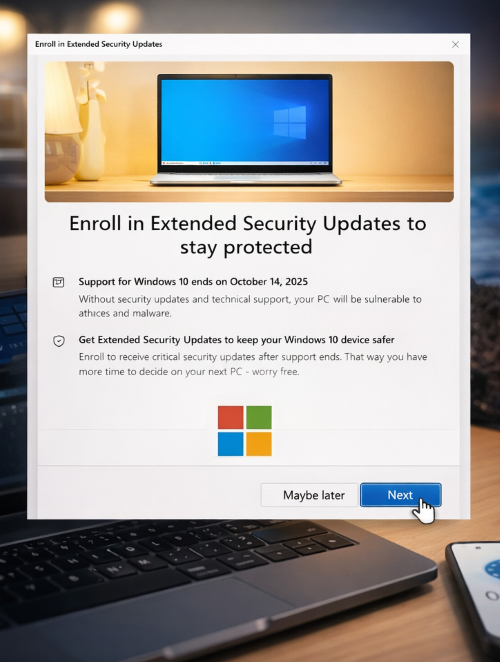
• If eligible, an “Enroll in Extended Security Updates” link/button will appear.
• Follow the on-screen steps to enroll.
💳 4. Enrollment Options
• Free enrollment by syncing PC settings to the cloud with a Microsoft account (Windows Backup) or redeeming Microsoft Rewards points.
📌 5. Requirements
To qualify:
• The device must be running Windows 10 version 22H2 with current updates installed.
• A Microsoft account is required for enrollment — especially for free or points-based options.
📅 6. What ESU Covers
• Only critical and important security updates (patches that help protect against threats).
• No new Windows features or performance improvements.
• No full technical support included.
🧾 Why This Matters
• For users who aren’t ready or can’t upgrade to Windows 11 (due to hardware limits or preference), ESU offers vital security updates for another year.
• It gives more time to plan an upgrade, backup data, or switch to a new device without leaving systems exposed to threats
🎥 For the complete video presentation, please click the link below:
👉 https://www.youtube.com/watch?v=D8kkCTRTSZ4
🎓 For tips, guides, and tutorial content, please visit our official YouTube channel:
👉 https://www.youtube.com/@OPENPINOYiWatchYou
📞 Contact Information
For inquiries and further assistance, please reach us through the following channels:
📱 Mobile / Viber: 0917-822-1232 / 0917-822-3232
📧 Email: openpinoy_onlinesales@hotmail.com
🌐 Website:
👉 Website for B2B - WWW.OPENPINOY.NET
👉 Website for Retail - WWW.OPENPINOY.COM
OPENPINOY©️
🤝 We are pleased to assist you with your needs.