


Create a One-Click Shutdown Shortcut
Date
2026-09-26
Views
132
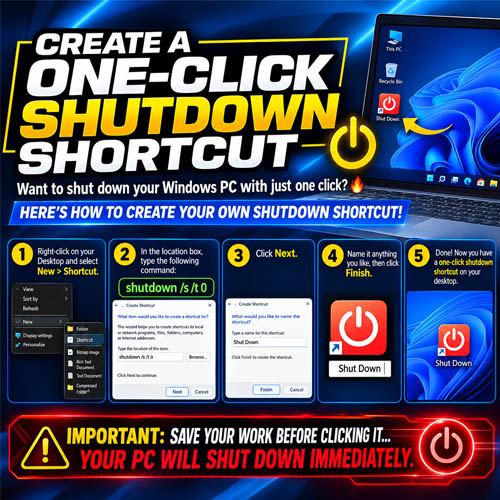
An easy Windows trick that lets you create your own one-click shutdown button directly on the desktop using a simple shortcut, a shutdown command, and a custom icon to make the button easy to recognize.
🖥️ Create the Shortcut Directly From Your Desktop
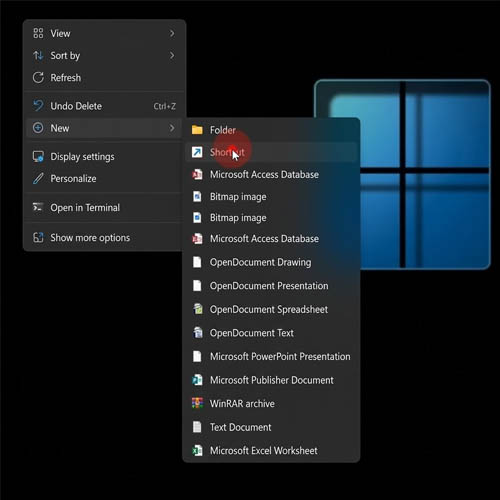
tart by right-clicking an empty space on the Windows desktop and choosing New → Shortcut. This opens the shortcut creation wizard where you can enter the command that Windows should execute.
⚡ Use the Shutdown Command
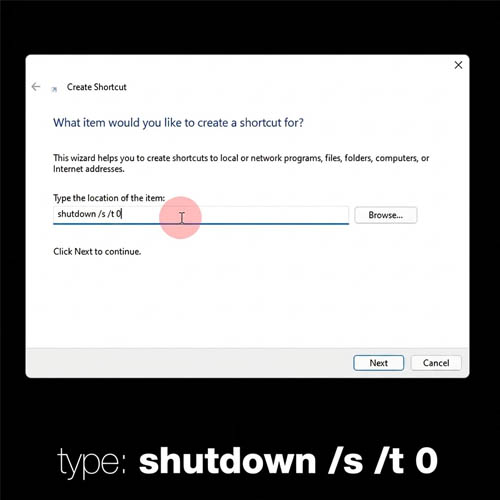
In the shortcut location field, enter the Windows shutdown command. This tells Windows to shut down the computer, with the /s parameter initiating shutdown and /t 0 setting the timer to zero seconds.
🏷️ Give Your Shortcut a Name
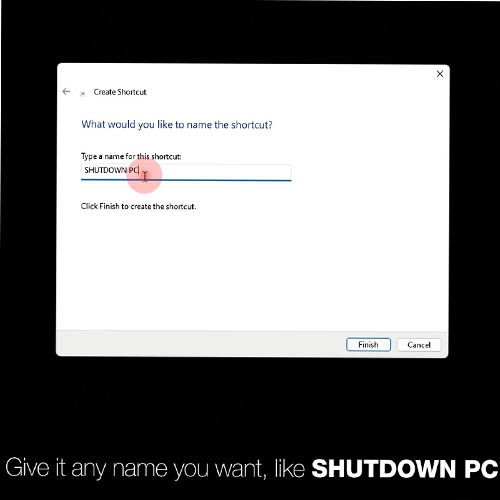
Once the command is entered, continue through the wizard and give the shortcut any name you want, such as SHUTDOWN PC. This creates a working shutdown shortcut directly on your desktop.
🎨 Make It Look Like a Real Shutdown Button
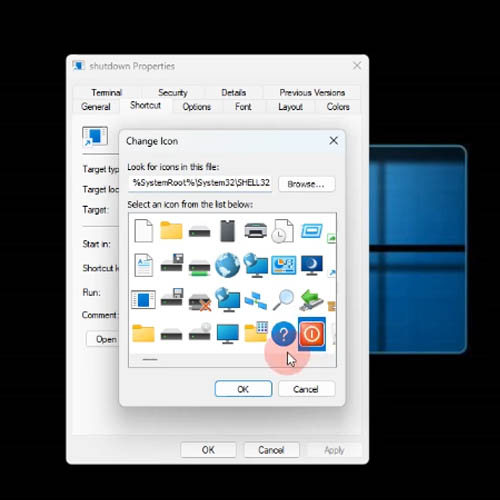
The video also shows how to customize the shortcut's appearance. Open the shortcut's Properties, go to the Shortcut tab, and select Change Icon. You can then choose an icon that makes the shortcut immediately recognizable as a shutdown button.
🖱️ One Click Is All It Takes

After the shortcut is created and customized, you have your own one-click shutdown button right on the desktop. Instead of navigating through the Start menu and shutdown options, you can simply click the shortcut to initiate the shutdown process.
🔑 Key Takeaways
● Windows allows you to create shortcuts using built-in commands
● shutdown /s /t 0 can be used to immediately initiate a shutdown
● The shortcut can be given any name you prefer
● You can change its icon through Shortcut → Change Icon
● Once configured, the shortcut provides a convenient one-click way to shut down your PC
🎥 For the complete video presentation, please click the link below:
https://youtu.be/RhXb_XyidPs?si=bv2Co_bluAazNYe7
🎓 For tips, guides, and tutorial content, please visit our official YouTube channel:
👉 https://www.youtube.com/@OPENPINOYiWatchYou
📞 Contact Information
For inquiries and further assistance, please reach us through the following channels:
📱 Mobile / Viber: 0917-822-1232 / 0917-822-3232
📧 Email: openpinoy_onlinesales@hotmail.com
🌐 Website:
👉 Website for B2B - WWW.OPENPINOY.NET
👉Website for Retail - WWW.OPENPINOY.COM
OPENPINOY©️
🤝 We are pleased to assist you with your needs.