


Game Crashed or Frozen? Try This Quick End Task Trick!
Date
2026-02-11
Views
696

A brief tutorial on how to fix the game when it crashed or frozen.
📥 1. Go to Settings page
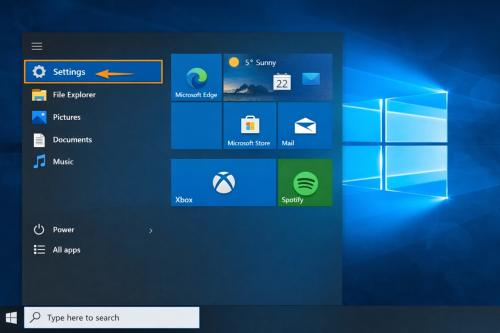
● Click Windows Icon and search for settings and click it.
🚀 2. Look for System page
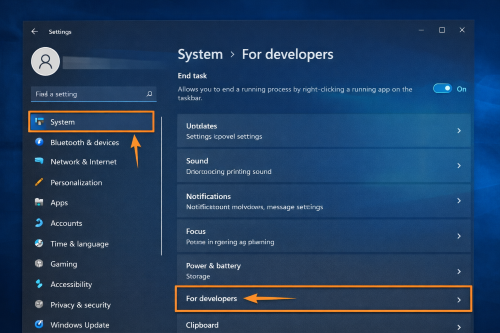
● Select “System” then scroll down and click on “For Developers”
● Activate the "End Task"
🧾 3. In-game crash
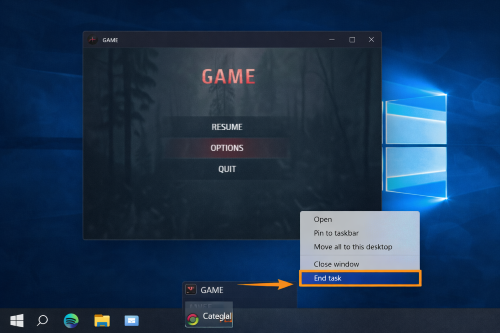
● If it crashed or froze while playing, just right click the app icon and select "End Task"
and that's it, you can now go back from playing and the control of your computer!
🎯 Who It's For?
● Gamers or computer users facing frustration with game freezers
● This tutorial is also applicable for beginners that's new to troubleshooting
🎥 For the complete video presentation, please click the link below:
👉 https://www.youtube.com/watch?v=2wGPvDcgPAs
🎓 For tips, guides, and tutorial content, please visit our official YouTube channel:
👉 https://www.youtube.com/@OPENPINOYiWatchYou
📞 Contact Information
For inquiries and further assistance, please reach us through the following channels:
📱 Mobile / Viber: 0917-822-1232 / 0917-822-3232
📧 Email: openpinoy_onlinesales@hotmail.com
🌐 Website:
👉 Website for B2B - WWW.OPENPINOY.NET
👉Website for Retail - WWW.OPENPINOY.COM
OPENPINOY©️
🤝 We are pleased to assist you with your needs.