


SSD COMPARISON
Date
2026-01-20
Views
486

The
video is a comparison of different computer storage devices,
with a focus on SSDs (Solid State Drives) and how
they differ from other storage types like HDDs (Hard Disk Drives). It
explains the advantages and features of SSDs to help users decide
which storage device suits their needs.
🧠 What an SSD Is
● SSD stands for Solid-State Drive, a form of storage that uses flash memory rather than mechanical parts like in traditional hard drives (HDDs). These drives are significantly faster, more reliable, and more energy-efficient.
🧩Types of SSDs
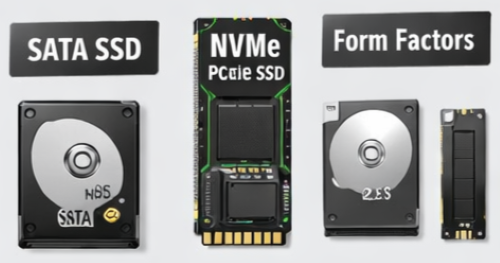
● 2.5" SATA SSD
‣ Connects via SATA interface (similar to old HDD ports).
‣ Faster than mechanical hard drives but slower than newer PCIe-based drives.
● M.2 SSDs
‣ Slim form factor plugged directly into the motherboard.
‣ Can use either SATA or NVMe protocol — NVMe versions are much faster because they connect through PCI Express.
NVMe Protocol
● Short for Non-Volatile Memory Express — it unlocks much higher data transfer speeds than SATA because it speaks directly to the CPU through PCI Express lanes.
📊 Fundamental Storage Differences
● HDD (Mechanical): Uses physical movement and a magnetic field to read/write data in binary form. It is the legacy standard for high-capacity storage.
● SSD (Electrical): Operates using electrical currents. It utilizes NAND Flash Memory, a type of non-volatile storage that does not require continuous power to keep data intact.
● Performance Gap: A standard 7200 RPM HDD provides read/write speeds of 80–160 MB/s, whereas a basic SATA SSD reaches 200–550 MB/s
📈 Understanding the M.2 Form Factor
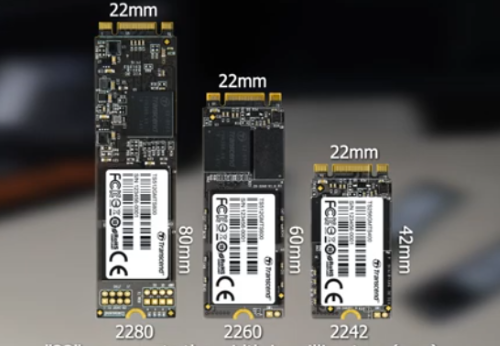
"M.2" refers to the shape and size (form factor) rather than the speed itself
● Naming Convention: The digits (e.g., 2280) define the physical size: the first two digits are the width (22mm), and the last two are the length (80mm).
● The Interface Trap: A common misconception is that all M.2 drives are fast. The video explains that M.2 SATA SSDs use the same interface as 2.5-inch drives and are not faster; they are simply smaller and "look neat".
💡 How to Identify M.2 Slots (The "Key" System)
Because M.2 slots look similar, the video explains how to distinguish them by looking at the "keys" (the notches on the connector):
● M Key: Found on PCIe NVMe storage devices
● B + M Key: Generally used for SATA storage devices
● Compatibility Warning: Users must check their motherboard manual because a physical slot might exist that does not support both SATA and NVMe protocols.
🎯 Practical Comparisons
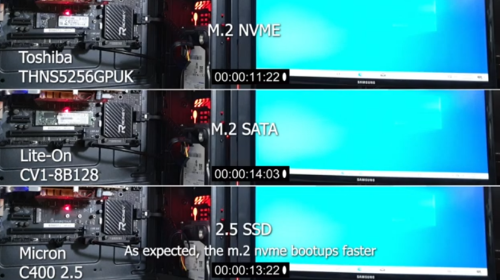
It discusses the real-world differences between SSD types, including:
● Speed: NVMe SSDs can be up to 5–10× faster than SATA SSDs, resulting in quicker boot-ups, faster file transfers, and smoother workflows.
● Installation: M.2 drives plug into a slot on the motherboard — no extra cables. SATA SSDs require both power and data cables.
● Use Cases: For Gaming/General Use: A standard M.2 SATA drive is perfectly adequate and more cost-effective
For Content Creation/Data Heavy Tasks: If you require "fast sequential read and write speeds" (like editing 4K video), the narrator recommends investing in an NVMe drive
📌 Core Takeaways
✅ SSDs are far better than HDDs for speed, responsiveness, and durability.
✅ SATA SSDs — best budget choice, good performance upgrade from HDDs.
✅ NVMe SSDs — superior speeds via PCIe, worth it for performance-focused builds.
✅ NAND type, controller, and cache matter as much as raw speed figures.
✅ Choose based on your real needs — not just the numbers.
🎥 For the complete video presentation, please click the link below:
👉 https://www.youtube.com/watch?v=qwbCgLqBI7s
🎓 For tips, guides, and tutorial content, please visit our official YouTube channel:
👉 https://www.youtube.com/@OPENPINOYiWatchYou
📞 Contact Information
For inquiries and further assistance, please reach us through the following channels:
📱 Mobile / Viber: 0917-822-1232 / 0917-822-3232
📧 Email: openpinoy_onlinesales@hotmail.com
🌐 Website:
👉 Website for B2B - WWW.OPENPINOY.NET
👉 Website for Retail - WWW.OPENPINOY.COM
OPENPINOY©️
🤝 We are pleased to assist you with your needs.